
At EasyTechJunkie, we're committed to delivering accurate, trustworthy information. Our expert-authored content is rigorously fact-checked and sourced from credible authorities. Discover how we uphold the highest standards in providing you with reliable knowledge.
What is WiFi®?
 Michael Anissimov
Michael Anissimov
Michael Anissimov
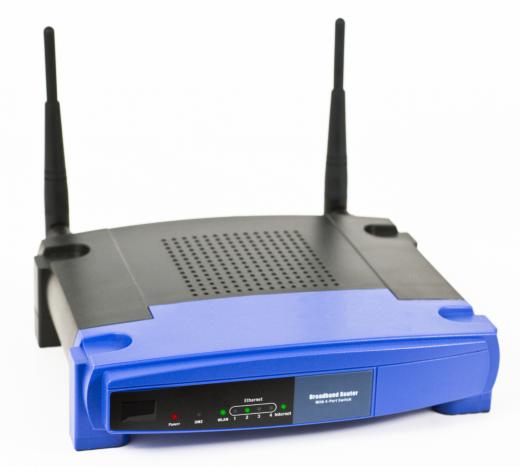
WiFi®, also spelled Wi-Fi®, is a wireless networking technology used across the globe. It refers to any system that uses the 802.11 standard, which was developed by the Institute of Electrical and Electronics Engineers (IEEE) and released in 1997. This standard was largely promoted by the Wi-Fi Alliance®, a trade group that pioneered commercialization of the technology. A person or business can use a wireless router or similar device to create a "hotspot" or area in which appropriate devices can connect wirelessly to a network or gain Internet access.
Basic Setup

In a WiFi® network, computers with appropriate network cards can connect wirelessly to a proper router. This router is usually connected to the Internet by means of a modem, often one featuring a high-speed connection. Any user within 200 feet or so (about 61 meters) of the access point can then connect to the Internet, though for good transfer rates, distances of 100 feet (around 30.5 meters) or less are often suggested. Retailers also sell signal boosters that extend the range of a wireless network.
Types of Networks

WiFi® networks can either be "open", so that anyone can use them, or "closed", in which case a password is needed. An area blanketed in wireless access through a device is often called a "wireless hotspot." Anyone with a device that includes appropriate functionality can connect to this network while in the hotspot. Through this connection, a local network can be accessed or Internet connectivity can be achieved. This allows people within the hotspot to connect to the Internet via the router and modem, often provided for employees at a business or as a complimentary service at coffee shops and similar locations.
Large Hotspots
There are efforts underway to turn entire cities, such as San Francisco, Portland, and Philadelphia, into big WiFi® hotspots. Many of these plans could offer free, ad-supported service or ad-free service for a small fee to anyone within the city. Such efforts require a great deal of infrastructure planning and support, though they would grant unparalleled connectivity for residents of those cities.
How It Works

WiFi® technology uses radio signals for communication, typically operating at a frequency of 2.4 gigahertz (GHz). Electronics that are "WiFi® Certified" are guaranteed to interoperate with each other regardless of brand, as long as they use the same version of the technology. Companies designed this standard to cater to lightweight computing systems, which are typically mobile and designed to consume minimal power. Hardware developers produce mobile phones, laptops, and tablet computers that are all compatible with this wireless technology. Desktop computers can typically connect to such a network through the installation of a wireless card or dongle.
Different Types

Different versions of the 802.11 standard have been released over the years, often indicated by a letter following the designation. Wireless-G, for example, introduced numerous improvements over the initial standard such as higher transfer rates. It is important for a computer or device user to recognize what type of WiFi® their device uses, to ensure compatibility with the router creating a hotspot. As the technology continues to improve, additional designations are likely to be released, though they are often backward compatible with earlier versions.
Michael Anissimov
Michael is a longtime EasyTechJunkie contributor who specializes in topics relating to paleontology, physics, biology, astronomy, chemistry, and futurism. In addition to being an avid blogger, Michael is particularly passionate about stem cell research, regenerative medicine, and life extension therapies. He has also worked for the Methuselah Foundation, the Singularity Institute for Artificial Intelligence, and the Lifeboat Foundation.
Learn more...
Michael Anissimov
Michael is a longtime EasyTechJunkie contributor who specializes in topics relating to paleontology, physics, biology, astronomy, chemistry, and futurism. In addition to being an avid blogger, Michael is particularly passionate about stem cell research, regenerative medicine, and life extension therapies. He has also worked for the Methuselah Foundation, the Singularity Institute for Artificial Intelligence, and the Lifeboat Foundation.
Learn more...AS FEATURED ON:
AS FEATURED ON:









-
![Wireless router.]() By: amorphisWireless router.
By: amorphisWireless router. -
![WiFi allows internet access without a wired connection.]() By: Yuri ArcursWiFi allows internet access without a wired connection.
By: Yuri ArcursWiFi allows internet access without a wired connection. -
![A wireless router.]()
A wireless router. -
![A WiFi® dongle.]() By: ScanrailA WiFi® dongle.
By: ScanrailA WiFi® dongle. -
![A sign in interface for an WiFi® connection.]() By: BriltA sign in interface for an WiFi® connection.
By: BriltA sign in interface for an WiFi® connection. -
![Desktops computers can typically connect to WiFi® networks if they have the proper hardware.]() By: ScanrailDesktops computers can typically connect to WiFi® networks if they have the proper hardware.
By: ScanrailDesktops computers can typically connect to WiFi® networks if they have the proper hardware. -
![Coffee shops may offer WiFi service.]() By: Monkey BusinessCoffee shops may offer WiFi service.
By: Monkey BusinessCoffee shops may offer WiFi service. -
![Most laptops are WiFi equipped.]() By: nyulMost laptops are WiFi equipped.
By: nyulMost laptops are WiFi equipped. -
![There is an effort underway to provide free WiFi throughout the City of Philadelphia.]() By: SeanPavonePhotoThere is an effort underway to provide free WiFi throughout the City of Philadelphia.
By: SeanPavonePhotoThere is an effort underway to provide free WiFi throughout the City of Philadelphia. -
![Public places like hotels or airports may offer wifi hotspots for the public to access the internet free of charge.]() By: arenaphotoukPublic places like hotels or airports may offer wifi hotspots for the public to access the internet free of charge.
By: arenaphotoukPublic places like hotels or airports may offer wifi hotspots for the public to access the internet free of charge. -
![Modern tablet computers can connect to WiFi®.]() By: bloomuaModern tablet computers can connect to WiFi®.
By: bloomuaModern tablet computers can connect to WiFi®. -
![Many hotels offer free WiFi for guests.]() By: steheapMany hotels offer free WiFi for guests.
By: steheapMany hotels offer free WiFi for guests.


Discussion Comments
I live in a condo development and we consist of attached and detached houses -- specifically townhouses and capes. We would like to offer our residents condo-wide free Wi-Fi. Is it possible to do and, if so, how do we go about it?
I took my tablet to Kenya and it didn't work, even though tablets bought in Kenya do connect to wi-fi with no problems. I worked out I could buy a portable router but found I had to buy a portable dongle to plug in to it.
My question is,will it work with my UK bought tablet?
And the next time I go to Kenya,will a UK bought portable router work in Kenya, or are they on different frequencies?
And lastly, why doesn't the tablet work if I plug the kenyan dongle directly into the tablet, even though it worked fine in my laptop?
How can I use my mobile WIFI to connect to the internet with my laptop?
I know something about wifi but how can I use it with my laptop? Can anyone help me?
I want to know what is 3G and how it works.
what is the difference between Wi-Fi and WiMax
How do I hook up this router/ zyxel?
My name is Graham. I used my pc as a typewriter. On discovering the vastness of virtuality, I discovered 'Skype'. I have two people I communicate with on it. Recently I was informed by Skype that I was no longer in a 'WiFi hotspot. I would dearly love to remedy this situation. My techno prowess is fairly naive. I learn quickly. Also says - 'Skype does not support my current network etc.' Whatever that means? Need advice.
i bought an LG 3G mobile that has wifi options, but i don't know how to connect or activate it. but i want to know about that. Please tell me.
how do I find out if my laptop has wi-fi? The model is DELL-VOSTRO-1014.
what is the difference between wifi and wireless internet access?
how can wi-fi be used effectively while establishing an enterprise?
why should i use wifi in my system?
wifi is free? my micro laptop has a wifi system. how can I use it?
Which is affordable? WiFi or DSL?
What would be the advantage of having a DVD player with WiFi access?
Can social networking sites be used? how can i get this on my laptop? please help me.
what is meant by wi-fi? i have a wi-fi feature for my mobile phone, but i don't know how to use it. Can anyone please help me out?
i am going to buy an xbox 360 with WI-FI. but does that mean i don't need any router? and if you need one, how big is the range of WI-FI? any answer would be fine. Thanks for reading and any answer can help me.
i have a wi-fi feature for my mobile phone, but i don't know how to use it. Can anyone please help me out?
how do I get a pc to make a phone call? what are the s/w needs? i have a bsnl broadband connection.
I want to know one thing: whether the GPRS and WiFi work simultaneously (in a handset over a cellular network) and if yes how it works and if it depends on the device or network provider.
I don't know how it works, but how do i get it? Would you please post it for me?
i am having wifi technology trouble with my laptop. can anybody tell me that is there any charges of accessing internet through wifi technology. Please help!
mostly laptops nowadays come equipped with internal wireless networking cards. How can we know that our laptop has equipped with this card?
I have HTC viva. How can I access free internet on it through cyber cafe or my office system?
why do we use wifi? how do I use wifi? i would like to know the details about wifi. Please explain to me.
How can i use a password in wifi ?
Does this system work with satellite?
What might be some wi-fi problems?
how does WiFi help us? why do we use it? can anyone please tell me? I will be very thankful to that person.
What is wireless? Is it other name of wifi?
What is wifi all about? Tell me in simple language. What is it used for?
Tell me how to get wifi on my ipod touch!
It is on the PSP and other video technology.
where are all the answers??
do you have to pay for wifi connection? Also how do you get on your ipod touch???
how do you qet wi-fi on your ipod touch???
i have a free connection of wifi in our dormitory. i don't know who owns it. how come i can't internet even though there is a signal? it is always 'cannot find server' when i started using the net. i'm using the wifi w/o security for months. does it mean it has now a protection security? and the one who can access the net is the owner only? ughhh. but it still doesn't have a password. the only thing is even though there is a signal i can't access the net. help!
I already have a wifi connection for my laptop in my home. If my brother gets a laptop would he be able to use his laptop in the house since I already have wifi?
How to have a WIFI network? Do i need to apply in any ISP out there?
I want to know about wifi systems because i am abc about wifi. How can I use that system in my laptop? Is it possible to use in my desktop?
What's the difference between N and G when buying a wireless router? . . and do I need a special card for my computer, too??
I am looking at a Smartphone (Blackberry Storm) It says "No wifi". Does that mean I will not be able to access the internet?
what is 3G technology?
how can i get my wireless G router to work wired?
it has the wired ports.
Does it work like GPRS with charges per kb?
how do you get wifi on your nokia n96 i try to watch bbci player and it sez it will only work with wifi
I have O2,How can I access free internet on it through cyber cafe
To all Yes wifi is working in The Desktop PC also
Desktop computers can use Wi-Fi technology as well, if you install a PCI Wireless Ethernet Adapter
can wifi be used on desk top computers?
what if I'm using a wifi certified phone and I'm in a wifi hotspot then i use the internet..does it have any fee?
I know how it works, but how do you get it? Would you please post it for me?
Post your comments