
At EasyTechJunkie, we're committed to delivering accurate, trustworthy information. Our expert-authored content is rigorously fact-checked and sourced from credible authorities. Discover how we uphold the highest standards in providing you with reliable knowledge.
What is the Difference Between WiFi® and Wireless Internet?
Wireless Internet is just one of the services that WiFi® optionally supports. WiFi® is a wireless communication standard used between computer devices to share files and resources. The signal cannot travel long distances without loss of integrity, and it is therefore used for Local Area Networks (LANs). In the home, the LAN might include a personal desktop system and laptop, while in the workplace, a the network commonly connects numerous computers within a commercial building. The signal might also cover a small region within a city, creating hot spots or places where the signal allows connectivity to the public through wireless access points (WAPs).
A WiFi® network is very easy to set up. The main computer acts as a server with a network interface card (NIC). The NIC features a small antenna that broadcasts and receives WiFi® signals. A router and switch direct traffic on the network and are commonly built into a high-speed modem to integrate this Internet into the WiFi® LAN. Each computer connected to the network, referred to as a client, also requires a WiFi® NIC.
Personal digital assistants, cell phones, and other handheld electronics commonly have WiFi® ability built-in. This allows them to connect wirelessly to a WiFi®-enabled network to transfer files, access data, or surf the Internet.
WiFi® formerly stood for "Wireless Fidelity," but the Wi-Fi Alliance that designed the standard is moving away from that designation. The standard exists so that manufacturers can produce interoperable components that will be compatible in this environment. If not for this common standard, each manufacturer would have proprietary WiFi®, making it very difficult for consumers to buy equipment. Every network would have to be built around a single brand name. Moreover, individual networks of different brands would have no way to communicate with one another, and public access strategies would be all but impossible.

Since the standard is always improving, different versions represent the standard at different phases of evolution. Standard 802.11a saw some success, but operates in the 5-gigahertz (GHz) range, requiring virtual line-of-sight operation. The first widely adopted WiFi® standard was 802.11b, which uses the 2.4 GHz range - a lower frequency that does not require near line-of-sight operation.

Standard 802.11g followed with an increased maximum data rate transfer from 802.11b’s 11 megabits per second (mbps) to 54 mbps. As of fall 2006, the newest draft standard, 802.11n, increases this rate to 540 mbps. Signals can successfully transmit data without loss of integrity from roughly 100 to 160 feet (30 to 50 meters), depending on the version used.

Security can be a concern with these technologies, as eavesdroppers can monitor unprotected data traffic. However, secure configuration is basic to these networks, and users can enable password protections and traffic encryption by following accompanying software instructions.
AS FEATURED ON:
AS FEATURED ON:









-
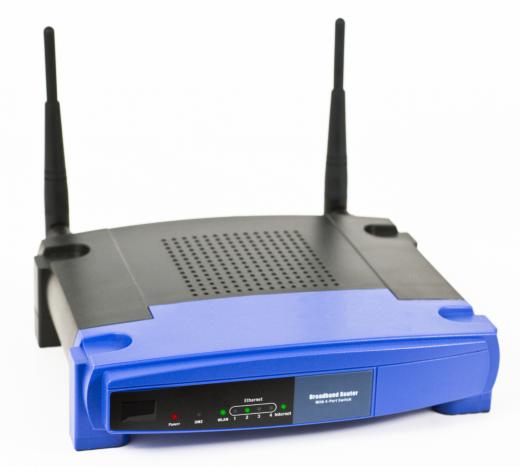
![Wireless router with two antennas. Some WiFi routers do not have any visible antennas.]()
Wireless router with two antennas. Some WiFi routers do not have any visible antennas. -
![A sign in interface for an Internet connection.]() By: BriltA sign in interface for an Internet connection.
By: BriltA sign in interface for an Internet connection. -
![Many retail businesses offer wireless internet services.]() By: Robert KneschkeMany retail businesses offer wireless internet services.
By: Robert KneschkeMany retail businesses offer wireless internet services. -
![Some devices can connect directly to a network.]() By: witthayaSome devices can connect directly to a network.
By: witthayaSome devices can connect directly to a network. -
![Cafes may offer wireless internet services.]() By: bercCafes may offer wireless internet services.
By: bercCafes may offer wireless internet services.


Discussion Comments
I have two desktop PC's, both in separate rooms. I also have a sky router in another room. I use an Edimax USB adapter to pick up the signal from the router. Somebody asked me why I use an adapter because I should pick up sky router without any problems. I tried that tonight and cannot connect to the internet so I had to install the adapter again. Am I doing this right? Could you please tell me?
I have connected to WiFi (I think) at a McD's but no web page appeared. It said 'connected' and I appeared to have updated a virus database through it, but why did I not get a web page?
I still do not understand what the difference is. I am still confused. Help. Make it simple, please.
If I get a wireless router for the NOOK tablet will it work? I have a modem through my cable company but it doesn't connect to any of my other devices either so they suggested I get a wireless router to rectify the problem.
The difference between Wi-Fi and Wireless Internet: "Wireless Internet" is a label that can be attached to any internet connection made via radio, such as: 3 and 4G (Mobile broadband), WiMax, etc.
"Wi-Fi" is a term trademarked by the Wi-Fi Alliance that can only be used to describe products that have been tested and found to fully implement one or more profiles, of the 802.11 family of wireless network standards, defined by the Wi-Fi Alliance. These profiles have been defined to aid interoperability and hence help to increase purchaser confidence.
@Post 13 (anon147049): Only devices that have passed Wi-Fi Alliance certification can use the term 'Wi-Fi' to describe its wireless network capabilities. Therefore, you can conclude that the Amazon Kindle contains an 802.11 wireless module that has not been certified.
In practical terms, what this may mean is that to reduce production costs they have not implemented full Wi-Fi functionality. For example, old 802.11 chipsets that do not support the WPA2 security standards, were not and will not be certified by the Wi-Fi Alliance, even though they may fully comply with all other aspects of the Wi-Fi standard. A reason for using old/mature chipsets is that their production costs can be very small, which in building a consumer device to a price point is an important consideration.
I do not have a Kindle to confirm the exact subset of 802.11 implemented. But a search of the Wi-Fi Alliance database does not find an entry explicitly for either Amazon or Kindle (searched 2011-Sep-26). However, if Amazon is using a third-party Wi-Fi Alliance certified plug-in module or adapter without modification then there wouldn't be a listing for the Kindle. However, as part of their supply agreement Amazon would be able to use the Wi-Fi certified mark with the Kindle.
This article appears to be well-written, but intended for an audience with knowledge of the technical terms mentioned here.
I agree with an earlier reader who is asking for practical clarification on the difference between wi-fi and wireless. If you are buying a device intended for one, is it going to work without the other?
It would be helpful if this can be explained to a reader who isn't familiar with all the technical terms referenced in the article.
It could be that you need to upgrade your operating system to Windows XP Professional. Windows XP Home edition doesn't support domain usage.
I still don't know the difference between wi-fi and wireless! Amazon Kindle DX says that it uses wireless but not wi-fi. Now as a practical matter, what does that mean?
this is useful. Thank you for posting it. i need to know about functioning of wireless networks. what is happening between the clients and router? how is the data transferred? please post some content related to these.
I am more interested in knowing about different types of wifi cards and their functions. Please give me more reviews on that topic.
I have a wifi card installed in my desktop computer. It is receiving a good/excellent signal when kept near the system, but when I try to open the browser to see the web page, I am always getting an error message stating that "The web page cannot be displayed. Server not found."
What should I do to rectify this problem? Please send me the easiest solution on how to configure the driver properly to make it work on my desktop.
i have to create a wireless network and i have no idea where to start!!
there are five islands and they all have to connect to the main server which is in a main building more than 100 meters away.
how would i link them up and what would i need to use?
i have a blackberry phone. the channel you mention I've encountered already and when i go to manage connection it directly activated my wireless but when i click the facebook and yahoo in my phone screen the connection was failed, so how can i access?
@TrueBrit: This could be a number of issues but I'd say the most likely reason is you are unable to receive the broadcast channel being used by the network; some wireless cards can only go to channel 11 or less while some routers can go way past 16. I'd find out what channels you can support and find out what channel it's broadcast on. It would be easy to fix if it was your own wireless network, probably not if it your works. Hope it helps. TechBH
I want to know if there is a difference between WiFi and wireless 802.11n
Hi, I bought my daughter an ipod touch for christmas, we have a wireless network here at home that I connect to with my laptop but I tried connecting the ipod through the network and it doesn't seem to pick it up or allow me to log onto it. Is it possible to connect an ipod touch to an at home wireless network?????????
Can a Blackberry be used as a wireless router? If I have a Blackberry without an active account (no network service), can it be connected to my PC via the USB port and configured to allow another wifi device to connect to my computer (i.e., iPod Touch).
I am using a Toshiba Satellite laptop running Windows Vista Home Premium, and I cannot find a signal coming from the wireless router. supposedly it is brodcasting everything as it should, but even with the laptop within a few feet of it, the laptop cannot find any signals coming from it.
Does anyone know what I should do?
Hi
Your problem is not because of windows firewall,
It is as because your company has not broadcasted the wireless connection(Wireless broadcasting is OFF)
so don\'t panic ! Try to set manual profile on your laptop of the wireless service your company is providing to you.
You can create manual profile in
Wireless Network Properties>Wireless network>Preferred Networks>Add
There you can add profile as given by your company
This will solve your problem
Akapree
Have you tried to scroll down? Or maybe disable other connections? Lots of times windows isn't actually set up to show you so many available networks. It's silly, but it might help.
Can any clever geek help me?
Using WiFi on my laptop I can detect a number of available wireless networks, but not the one that my company has set up for me to use. The signal shows up on other people's laptops, and they can log in; but not mine! It's not a location issue as I've tried all over the building; and stood right next to the guy who is getting a good signal; but nothing on my laptop (and yes I refresh all the time, repair again and again but cannot pick up the signal)I'm using Windows XP home, and have 802.11b/g wireles LAN enabled. Could this be a firewall problem.
And yes I am connecting wirelessly on other networks, so I must be enabled.
Any advice much welcomed as it's driving me nuts!!
Many Thanks
TrueBrit
Post your comments