
At EasyTechJunkie, we're committed to delivering accurate, trustworthy information. Our expert-authored content is rigorously fact-checked and sourced from credible authorities. Discover how we uphold the highest standards in providing you with reliable knowledge.
What is Defragmenting a Computer?
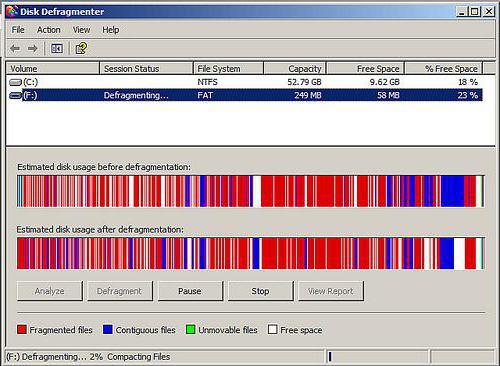
Over time and with regular use, files and folders on a computer's hard drive break down or become fragmented. When computer files are fragmented, they are typically disorganized and in the wrong place. This can cause the system to run slowly and to experience processing problems. Defragmenting the computer gathers and organizes the files, which usually improves retrieval time and the computer's overall performance.
For example, a computer program must access various files on the hard drive every time it is run. If those files are spread out on opposite sides of the hard drive instead of gathered and organized neatly, as they are supposed to be, the computer will have to work extra hard and take extra time to access the information it needs. In some cases, severe defragmenting may even cause a program to stop running entirely.

Defragmenting, also referred to as "defragging," reorganizes the hard drive by putting pieces of related data back together so that files are organized in a contiguous fashion. As a result, the computer system can access files more efficiently. By efficiently organizing files and folders, defragmenting will leave the computer's free space in one big chunk. This will allow new files to be saved in an orderly fashion, thereby reducing the need for future defragmentation.
Benefits of Defragging

As the overall size of disk drives keeps increasing, defragmenting a computer regularly may even help to increase its life-span. A system needs to work quite hard in order to collect fragmented information across larger and larger disks. Considering the amount of work this takes, it seems likely that defragmenting can help a hard drive last significantly longer.
Though some computer experts argue that today's operating systems are efficient enough to eliminate the need for defragmenting altogether, it is generally recommended that computer users defrag their systems on a regular basis. Average users will probably find that bimonthly defragmenting produces sufficient results. Users who notice a frequent loss of efficiency and speed may choose to defrag more often.
How to Defragment
All computer systems come with some type of defragmenter tool, commonly found under the "System Tools" option in Windows-based PC environments. Such tools typically come with an analysis feature that will actually tell users if their computers need defragging or not. You can also defragment disks from a "C prompt" command line using the "defrag" command. Additional information on how to defragment a computer should also be available on the Internet.
AS FEATURED ON:
AS FEATURED ON:









-
![Defragmenting a hard drive is a common maintenance process that rearranges data in a contiguous fashion ultimately increasing performance.]() By: meepoohyaphotoDefragmenting a hard drive is a common maintenance process that rearranges data in a contiguous fashion ultimately increasing performance.
By: meepoohyaphotoDefragmenting a hard drive is a common maintenance process that rearranges data in a contiguous fashion ultimately increasing performance. -
![Windows OS systems feature tools for disc defragmentation.]() By: madrabanWindows OS systems feature tools for disc defragmentation.
By: madrabanWindows OS systems feature tools for disc defragmentation.

Discussion Comments
Over a period of time, Mac starts slowing down due to fragmented data however, there are many other reasons for sluggish behaviors of a Mac. You can use a defrag tool because Mac OS X does not provide any inbuilt tools for defragging a Mac.
One day my desk top would not boot Vista 32-bit. I turned it on, got the "launch startup repair" or "start windows normally" options. I chose the first, got the same message. Then I chose the second, the computer scanned, then I got the BSOD "collecting data for crash dump...physical dump...", then screen goes back to "launch startup..." I have tried:
1. Booting with F8 pressed to no avail
2. In safe mode, I get BIOS needs updating or something to that effect
3. Other advanced options, which get me back to "launch startup..."
4. Re-installing my vista CD, but it does not acknowledge a disk in the drive.
This is a quandary for me and maybe for others. What should I do?
I know this hasn't really got anything to do with defragging but
i keep losing space in the c drive for no apparent reason and i keep losing more. can anyone explain why? please help.
The hdd should not crash from a defrag unless the paging is all messed up and still at that, with our ram and multi core processors, that should be non issue. Also with the rpms that an hdd runs at now and the ram, we have today a defrag would "help" but not be noticeable like it was on a floppy disk but still the defrag of a floppy never made a head crash or any such problems and that was technology from the 70's.
@anon9064: Whoever told you to defrag once a week is a retard and yes any hdd hooked up will be defragged unless you specify the drive.
@anon63031: No, you will not lose any files because it writes them to the disk not the memory so even if the power goes off you will not lose your data.
@anon86613: This post does not even go into the specs of how frag and defrag work with sectors and such and yes that is useful in understanding what defrag does so you don't walk into it blind like with other such programs or whatever.
As a computer professional of 20 years standing, it is my opinion that defragging is purely an amateurs' time-wasting exercise that "seems" like a good idea. After all, you get to use important-sounding words like "contiguous". Maybe it was a good idea 20 years ago, but now all it does is thrash the HDD. By the way, NTFS was intended to obviate the need for defrag.
This post shows what defragmenting is and how it is done. Quite useful.
A registry error can be very serious or it can be nothing. For instance, if you installed a program and then install it and all of the registry entries don't get cleared, that can produced an error. That is harmless. Unless you know what you're doing you're better off leaving it.
You can get a registry cleaner from Snapfiles, but use caution because if you delete something that needs to be used you can mess up your computer. Always back up your registry and create a restore point before altering your registry. You can defrag while using your computer but the results will not be 100 percent because some files will be in use and not movable or accessible.
For optimal results defrag in safe mode. That way as few programs as possible are running.
Is there consequences of whatever when using our computer disk defragmenter program to defrag?
Example, file loss, some programs that are running last time are not able to run after defragment? Please reply :)
don't defragment.
I like this defrag business. it helps my computer run smooth.
Oh, and comment number 15 made by anon35565: Defragging with Windows Vista or Windows 7 causes the system to create a restore point, which generally takes up 1-2 Gigs of space. Running the tool "Disk Cleanup" that comes with the Windows systems can be used to delete all restore points except the most recently made one - the one made from the defrag process - thus giving you the lost space back.
Defragmentation does take a lot of time, and the only stress it puts on your computer is it's searching through your files and drives. Macs are crap. Don't even bother. Files do not get deleted during fragmentation, the files that make up that file just get more organized. Hard drives do not need to be defragged every day - maybe once a month at the least.
I show 51 registry errors after defragging every time. How can i get them fixed? "It" will fix 1-2 each time. But i still show 51 it can't fix. Any ideas?
Why does my C: Drive space decrease after I defrag? Any ideas? O.o
will it be good to defrag my computer?? im confused!
just get MAC!
It took me 36 hours to defrag my computer for the first time.
does everything still work when you defrag or will some files stop working?
I have Microsoft Flight Simulator X on my computer, If I defragment it, will it be deleted???
Yup, first time you defrag takes a really long time. Regular defragging from this point forward will go faster. You might want to check your firewall though, sometimes that can stop the defragging, and you are basically on hold. Turn it off and disconnect from the internet...
In October, 2007, I purchased at Circuit City an HP Pavilion with Windows Vista. The software I use daily is MS Office Suite, HP 7400 Series printer driver, NeatReceipts, and Norton 360.
I find that the computer runs so slow and gets hung up. Firedog at Circuit City ran a registry on it, suggested I uncheck user account control, and defrag once per week. I started the defrag at 1am. It is now 8am, and it's still defragging! I have an external hard drive connected via usb port. Maybe that is why it is taking so long.
Any other ideas?
I am not a believer in *frequent* (stressing frequent) disk defrag for the following reasons:
1) Typical disk defrag looks at 100% of your file system and works on 100% of fragmented files while a small percentage of those files will ever be accessed again.
2) During the course of any disk intensive operation, the file system will receive requests for other files, resulting in interrupted file I/O and seeking anyway, i.e. fragmented I/O weather your file is contiguous or not.
3) Disk defrag process is more intensive than a simple file read. Defrag reads and writes to relocate and attempt to create contiguous files.
One of my suggestions is to use what I call a "incremental defrag" utility like CONTIG which you can set to run on selected files or folders. For example, your game or movie files.
Understanding that my views are somewhat controversial, this makes for valuable discussion. :-)
Fragmentation is what reduces the life of the HDD. Imagine having to sprint in record time to fetch hundreds of pages from a book, that too when you have joint pain! The HDD being mechanical can bog down under the strain of having to do extra work to seek file fragments. This will not only slow down the system, but also cause stability issues like crashes and freezes. Fragmentation is a serious issue on servers which need maximum uptime and where thousands of files get created/ deleted every single day.
Running a disk intensive program like playing a game or watching a movie on a HDD for more than an hour at a stretch is much more 'disk thrashing' than defragmenting it. That is because if the drive is defragged regularly, it wouldn't take more than a few minutes each successive time and that's hardly any stress on the drive.
I challenge this concept:
"it seems likely that defragmenting can help your hard drive last significantly longer."
The process of defragging works your disk harder than any other normal operation. It causes your disk to "thrash" for hours and done on a "regular" basis will most likely reduce the life of your hard drive.
Post your comments