
At EasyTechJunkie, we're committed to delivering accurate, trustworthy information. Our expert-authored content is rigorously fact-checked and sourced from credible authorities. Discover how we uphold the highest standards in providing you with reliable knowledge.
What is a Laptop Touchpad?
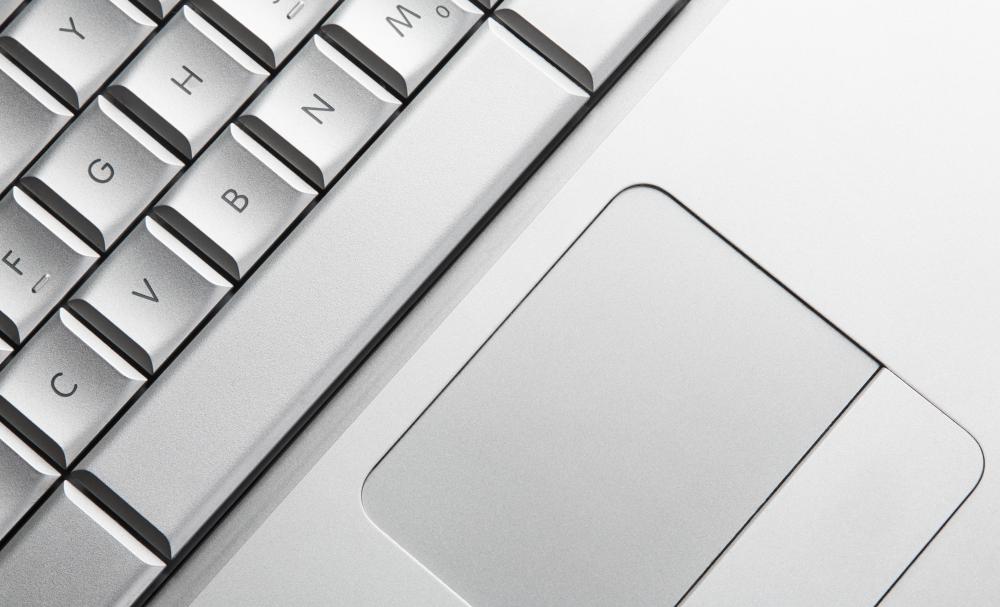
A laptop touchpad is a device that is built into laptop and notebook computers. The pad has functions that are similar or the same as an external mouse. It allows laptop users to work from the convenience of any small space. With the use of a touchpad users still have the control offered by using an external mouse for onscreen computer movements.
The movements that are offered by a laptop touchpad can also be completed through the use of several keystrokes; however, keystrokes can be time consuming and difficult to remember. As a result of the difficulty of keystrokes, the touchpad was created for laptop and notebook users. The first touchpads were created in the 1990s, and the technology of the laptop touchpad has been advancing since then.

As a pointing device a laptop touchpad is a relative motion device. Like all relative motion devices a notebook touchpad translates user movements. It is made specifically to sense the movement of a finger, and it will not sense the movements of other objects. A touchpad’s movements are shown on the computer screen through the motion of the cursor. In fact, the cursor will move at the same rate as the user’s finger moves on the laptop touchpad.

A touchpad can vary in size. It depends on the brand and model of the computer. Size is not the only factor that can vary on a pad. There are also accessories and extra features. Some laptop pads have buttons for left and right clicking, while others do not. Besides buttons a touchpad’s features can be different from model to model. A laptop pad can have a section for onscreen scrolling and other specialized movements.

The laptop touchpad was initially created as a substitute for an external mouse and mouse pad. However, today touchpads and external mouse devices are both used from notebook computers. Some users prefer an external mouse, and other users like the laptop touchpad. For the laptop users that desire an external mouse there are cordless infrared mice that do not require the use of a mouse pad.
Some touchpads can be overly sensitive, and they might interfere with a user’s typing. For these pads there are ways to temporarily disable them. One of the easiest ways to temporarily disable a laptop touchpad is by pressing a small button. It is usually located above the touchpad itself.
AS FEATURED ON:
AS FEATURED ON:









-
![A couple using a laptop with a touchpad.]() By: Yuri ArcursA couple using a laptop with a touchpad.
By: Yuri ArcursA couple using a laptop with a touchpad. -
![A laptop with a touchpad.]() By: Nikolai SorokinA laptop with a touchpad.
By: Nikolai SorokinA laptop with a touchpad. -
![The sensitivity of computer touchpads can be adjusted so that they require more or less finger pressure.]() By: Alexey LaputinThe sensitivity of computer touchpads can be adjusted so that they require more or less finger pressure.
By: Alexey LaputinThe sensitivity of computer touchpads can be adjusted so that they require more or less finger pressure.


Discussion Comments
I have a Lenovo laptop, which has a track point in the middle of the keyboard as well as a traditional touchpad. I prefer the track point most of the time, because it is a more exact and stable feel to use. However, I like that I have the pad for when other people use my computer, because the track point often confuses them if they are not used to it.
Does anyone know how you can safely clean a laptop touchpad once it starts to get discolored? Do you have any tips for making your own cleanser at home?
I have a white MacBook and have found that my touchpad is starting to look a bit grey. I have tried wiping it down with a damp paper towel but am worried about trying anything harsher than water right now.
For the rest of my computer I am using a general-purpose laptop cleaner, but it doesn't say anything about it being OK for a laptop touchpad. I am sure it isn’t a good idea to use a harsh chemical on a laptop touchpad because it seems to me made out of a really odd material.
When searching for a new laptop it is a good idea to try out the touchpad before you buy. I have found in my search for a new computer that not all laptop touch pads are created equal.
I find some models of laptops have touchpad’s that aren't nearly as sensitive as they need to be. This can be a huge problem if you are doing something like playing computer games and you need a fast reaction time.
A good idea is to make sure you try some things that you would normally do while testing out computers at the store. Play a quick game and see if the touchpad responds to your touch, as you want. Most laptops on display have Internet access and it should be easy for you to try different things.
@dimpley - I would not accept that kind of an answer if I were you. They sound like they are just blowing you off with their line about "dust". If the system is still under warranty, just keep taking it back until they fix it or give you a new one. Eventually they'll get sick of their face. If the store has a corporate number, try that too.
I like that there are touchpads so I can still use my laptop if I forget to bring a mouse, but they do occasionally cause a problem for me due to my huge hands.
Laptop touchpad sensitivity has gotten a lot better over the years, and now when I try to type on that little keyboard, my palms sometimes drag on the touchpad and send the cursor all over the place. It can get downright silly.
On the one I use right now, it's not that bad. But my fiancee's laptop has such as sensitive pad I have to disable it and use a mouse if I'm going to type. Very annoying.
@mabeT - I certainly remember the old laptops. I had an old ThinkPad that you could have probably used to fight off a grizzly bear. The thing was gigantic, and the battery life wasn't so good.
The touchpads now are so much different than the ones on those old computers. On my new Toshiba laptop, the touchpad is extremely sensitive and precise. I really like how it handles multiple taps too, so you can use it like a mouse. I am not a big fan of using the buttons that go with it.
@pennywell - I see what you're saying but think about how laptop touchpads have already changed the way we interact with computers. At least for the younger generations today, we interface with computers so naturally, without even really having to think about how we're navigating or using the machine. Perhaps the touchpads that @Ivan83 mentioned will further develop our capacity not only to work with computers but also in our thinking and coordination.
@Ivan83 - What you've mentioned about multiple simultaneous touchpoints on a touchpad sounds really intriguing, but I'm also wondering how practical it might be. How many people can really perform separate tasks with both hands simultaneously and efficiently? Imagine painting with one hand while writing with the other!
I remember when I first learned to use a laptop that the advent of the touchpad was so amazing. This was back when laptops were pretty new, and they were still about as heavy as a Webster’s World Dictionary. You know, the five inch thick hard cover volume.
It was not the easiest thing in the world to master the use of the pad, and it was actually quite a bit different from using a desktop.
The keyboards were way smaller, and the battery life was incredibly short. Still, though, the hardest part for me was learning to control my cursor well with the touchpad.
Now I take it for granted and just scoot right along, but then it was a really big deal.
Really – what good is a laptop without the touchpad? Not very much good at all, unless you want to use it like you would a desktop.
So you can imagine my frustration when I brought a brand new, high end computer just to find that the touchpad did not work properly. That’s right. Sometimes it has a mind of its own, and if I tell it to move left it goes right anyway.
The maker claimed dust beneath the pad and blew it out. That did help for a little while, but in a couple of days we were right back to the struggle.
I don’t think it has a thing in the world to do with dust for the simple fact that when I shut down the computer and then restart it the struggle ends for a short time.
I saw an interesting demonstration recently of a technology that could become the standard as computers move into the future. Obviously touch screen technology has become huge with ipod touches and the rise of tablet computers. Everyone seems to agree that this will be the interface of the future.
So here is the basis of the new technology. Most interfaces allow you to manipulate one object at a time with one finger. Think of a regular touchpad and oyu index finger. But there are a number of times when it would help to have multiple mouse points that could coexist simultaneously. So the technology is essentially a large touch screen that allows you to use all ten fingers to manipulate things on the screen at once. You can minimize a window while you move another or click n a link while you save a document.
The demonstration was incredible and very convincing. The potential of this technology is huge. Modern computers have become so complicated and overloaded graphic wise that this technology is quickly becoming a necessity. Hopefully we will see some version on the shelves in the next 5 years.
The touchpad is really key to the whole concept of a laptop. Without a touchpad, users would have to carry around a peripheral mouse which would mean an extra piece of equipment, more space and more weight. The whole appeal of a laptop is that it is a thin, lightweight completely self contained device. The more things you have to plug into it the less appeal it maintains.
Post your comments