
At EasyTechJunkie, we're committed to delivering accurate, trustworthy information. Our expert-authored content is rigorously fact-checked and sourced from credible authorities. Discover how we uphold the highest standards in providing you with reliable knowledge.
What Is a CRT Monitor?
 Amanda Holland
Amanda Holland
Amanda Holland
A CRT (cathode-ray tube) monitor is an analog display device that creates a visible image on the screen by directing three electron beams over millions of phosphor dots to make them light up. In a color monitor, the screen is composed of numerous stripes of alternating red, green, and blue phosphor dots, which get activated by the electrons and combine to make countless different hues.
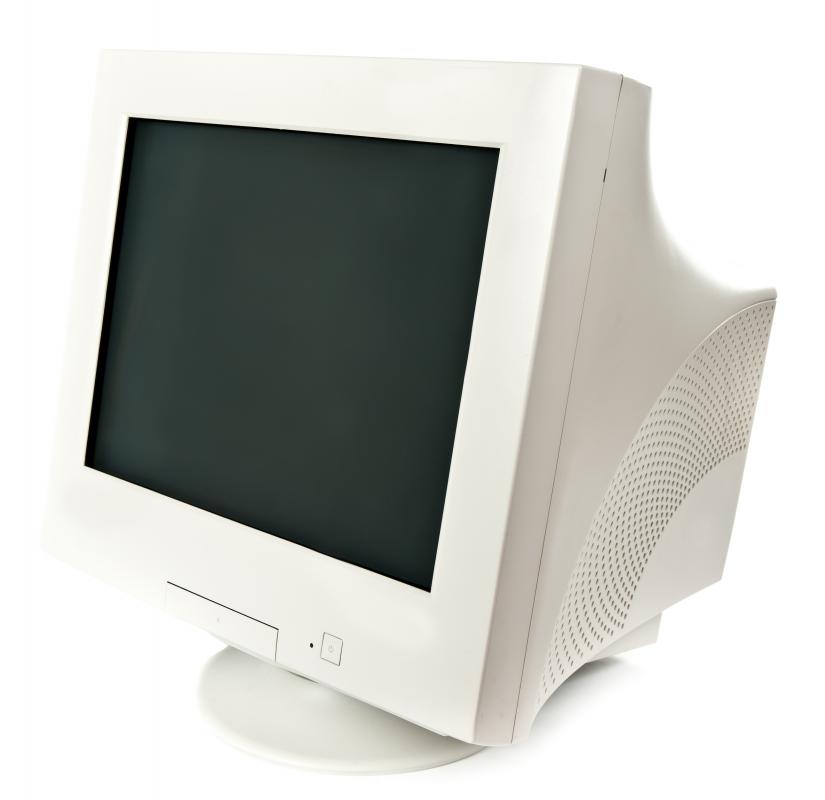
The electron beam repetitively scans the entire front of the tube to “paint” and refresh the image nearly 100 times every second. Computer monitors and televisions that use CRT technology have large, heavy physical casings. The long length between the front screen and the back of the case is necessary to accommodate the length of the vacuum tube.
A Brief History of CRT Monitors

Cathode-ray tubes were commonly used in televisions and computer monitors throughout the mid-to-late 1900s. Throughout that time, manufacturers continually improved performance and resolution. Most computer monitors in the 1970s only displayed green text on a black screen. By 1990, IBM’s Extended Graphics Array (XGA) display boasted 16.8 million colors in 800 x 600 pixel resolution.

In the early 2000s, advances in technology made flat-panel displays more accessible. These newer display types (LCD, plasma, and OLED) don’t require a large casing and are more energy efficient. Manufacturing costs are lower than for CRT monitors, and flat-panel displays can be made in larger sizes than CRTs. These factors make flat-panel displays far more popular among consumers.
Fun facts
- German physicists Julius Plücker and Johann Wilhelm Hittorf first observed cathode rays in 1869.
- The Braun tube was the earliest version of a CRT. It was invented by German physicist Ferdinand Braun in 1897.
- Japanese engineer Kenjiro Takayanagi demonstrated a CRT television in 1929.
- German manufacturer Telefunken started making CRT television sets in 1934.
- LCD screens surpassed CRTs in 2008.
Is a CRT Monitor Dangerous?

Depending on how old you are, you may remember your parents chiding you for sitting too close to the TV and claiming that it would damage your eyes. However, these fears seem to be largely unsubstantiated. There are some legitimate health and safety concerns with CRT monitors, but none of them link sitting too close to the screen with negative effects on eyesight.
- A CRT monitor emits X-ray radiation, but it’s a small amount that’s regulated by the FDA.
- There is a significant amount of stored electrical charge in a CRT, even one that’s powered off. Breaking a CRT monitor or attempting to dismantle it without proper tools and training can lead to a severe electrical shock.
- Puncturing the vacuum tube will create an implosion that can spray glass shards everywhere.
- CRT monitors contain toxic materials, including mercury, which can leak out if the monitor breaks.
If you have a CRT monitor you no longer want, it’s not safe to toss it in your trash can. You should contact your local authorities for information on safe disposal methods and/or recycling options.
Is CRT Better Than LCD?

While flat-panel LCD and OLED monitors and televisions are more common nowadays than CRTs, the older technology is still superior in some ways. A CRT monitor can display/refresh an image faster than an LCD screen. This means the monitor can respond faster to input and avoid motion-blur issues that are common in LCD screens. The color range and contrast is often better on a CRT, and this type of monitor supports deeper black tones. For some computer gamers, these advantages are enough to warrant scouring the internet for old CRT monitors.
Can You Still Buy CRT Monitors?

If you want to check out the benefits of a CRT monitor for yourself, prepare for a bit of work. Because CRTs aren’t manufactured anymore, you won’t be able to grab one at your local big box store. You’ll probably be able to find a decent selection on eBay or through Craigslist or your local thrift store. CRT monitors can be pricey, especially if you have to pay for shipping, and it’s important to make sure you choose a model that’s compatible with your computer or gaming console.
Will CRT Monitors Make a Comeback?
When LCDs took over the market in the early 2000s, most companies drastically reduced their CRT manufacturing to account for the decreased demand. Sony stopped making CRT monitors in 2005, and 2008 was the last year Samsung introduced new CRT models. Despite pleas from a small number of passionate gamers who prefer CRT screens over LCDs, the lack of adequate market demand will likely prevent any major company from restarting production any time soon.
What Does CRT Mean?
CRT, which stands for Cathode-Ray Tube, is an antiquated type of display technology that was commonly used in televisions and computer monitors in the 1900s. While CRT displays are no longer manufactured, they maintain some advantages over modern LCD, OLED, and plasma displays, and are sometimes prized by gamers.
What Happened to CRT Displays?
With the advent of LCD screens in the early 2000s, CRT displays became less popular. LCDs are more compact, more energy-efficient, and cost less to make. They can also be made with larger screen sizes than CRT monitors. They’re vastly lighter; a 21-inch CRT display can weigh between 50 and 60 pounds, and some weigh nearly 100 pounds. One of the rarest and most sought-after CRT monitors, the Sony GDM-FW900, had a screen size of 24” and a widescreen aspect ratio of 16:9 and weighed about that much.
However, modern displays are not totally superior to CRT screens. CRT displays can refresh the display at a faster rate than LCDs, making motion on the screen appear smoother with less motion blur. CRTs also have higher contrast ratios and tend to have superior color ranges.
Does Anyone Use CRT Displays Anymore?
While CRT displays are no longer made, they are sometimes sought after by gamers for their superior refresh rates and contrast ratios. They are also able to avoid the problem of input lag, which is when commands on a controller take longer to register.
LCD gaming displays are catching up to CRTs, however, and can be obtained with comparable refresh rates to CRTs. Still, motion blur remains an issue even on the highest-end gaming monitors.
Finally, retro games were simply designed with CRT in mind, meaning older video games don’t have an authentic look on modern display technologies. Retro gamers commonly want their experience to be as close to the original as possible, and using a modern LCD monitor just doesn’t have the same effect.
How Am I Supposed To Use CRT If the Interface Is Different?
CRTs do not support modern display interfaces such as HDMI or DisplayPort. Instead, they typically use VGA. Unlike CRT, the VGA interface is still manufactured today. However, modern graphics cards and motherboards typically do not have a VGA port. Thankfully, you can remedy this with an adapter. Not all adapters are equal, though, so make sure the adapter you use supports the resolution and refresh rate you plan to use.
You may encounter CRTs that don’t use VGA. Some use DVI-A or DIV-I interfaces, and others use composite inputs.
What Is Dot Pitch?
Unlike modern LCDs, the sharpness of CRT monitors isn’t measured primarily in resolution. Instead, it’s determined by dot pitch.
To understand dot pitch, you need to understand a little about how a CRT screen creates an image. CRT monitors shoot electrons toward the phosphors at the front of the machine, which is then filtered by either a shadow mask or an aperture grill. The sharpness of the image is defined by how large the gaps in the shadow mask or aperture grill are. The shorter the distance, the sharper the image. This is referred to as dot pitch, and it is measured in millimeters.
If you want the sharpest possible display on a CRT monitor, you’ll want one with a dot pitch below .28 millimeters. It’s very rare for a dot pitch to fall below .21 millimeters, but the lower, the better.
Why Does Dot Pitch Matter?
If you want to display an image with a high resolution (say, above 1600 x 1200) on a CRT monitor, the dot pitch becomes especially relevant. If the dot pitch is too large, an image will look blurry at higher resolutions. However, if you only intend to use lower resolutions, dot pitch has little impact on the sharpness of the screen. Regardless of the resolution you use, it is best not to go above .28 millimeters to ensure adequate clarity.
What Is the Difference Between a Shadow Mask and an Aperture Grill?
Each of these technologies works differently to filter electrons at the front of the screen. A shadow mask uses a metal sheet with evenly spaced holes, and an aperture grill uses a wire array. Both will create a comprehensive color image to generate the final product you see on the screen.
Generally, an aperture grill will display a better image than a shadow mask, creating a brighter and more colorful image because it handles light better. However, this is not always the case, and some CRTs with shadow masks have superior image quality than those with aperture grills.
Sources:
Amanda Holland
Amanda Holland is equally passionate about math and grammar, and she has incorporated both into her career.
She spent several years as a signals analyst for the Defense Department, creating and editing reports for the intelligence community. After her two kids were born, she transitioned to a career as a freelance writer. When she isn't crafting content, she's usually reading, baking, or playing video games.
Learn more...
Amanda Holland
Amanda Holland is equally passionate about math and grammar, and she has incorporated both into her career.
She spent several years as a signals analyst for the Defense Department, creating and editing reports for the intelligence community. After her two kids were born, she transitioned to a career as a freelance writer. When she isn't crafting content, she's usually reading, baking, or playing video games. Learn more...
AS FEATURED ON:
AS FEATURED ON:









-
![CRT monitor.]() By: Ruslan KudrinCRT monitor.
By: Ruslan KudrinCRT monitor. -
![Old CRT Monitor.]()
Old CRT Monitor. -
![Some gamers believe the faster refresh rate and minimal motion blur of CRT monitors creates a better gaming experience, especially for older titles with lower-resolution graphics.]()
Some gamers believe the faster refresh rate and minimal motion blur of CRT monitors creates a better gaming experience, especially for older titles with lower-resolution graphics. -
![CRT monitors have heavy, bulky physical casings and comparatively small screens.]()
CRT monitors have heavy, bulky physical casings and comparatively small screens. -
![Flat-panel monitors are available in bigger screen sizes than CRTs, and they don’t take up a lot of front-to-back space.]()
Flat-panel monitors are available in bigger screen sizes than CRTs, and they don’t take up a lot of front-to-back space.


Discussion Comments
You can know by just looking at the monitor size. CRT are big bulky monitors like those old heavy normal TV screen. CRT are newer flat monitors.
A cathode ray tube (CRT) monitor is an analog computer display or television set with a large, deep casing. This type of monitor uses streams of electrons that activate dots or pixels on the screen to create a full image.
In contrast to this, liquid crystal display (LCD) monitors and plasma television sets, or flat panel displays, use newer digital technologies. While flat-screens have become increasingly popular, there are still some advantages to CRT models that can make them better for some situations.
I have a high end crt monitor, and some people say that I could get some good money for it. What do you think? And any ideas regarding a ballpark figure, as to what I might get for it?
CRT monitors are considerably heavier than other types and use lots more power than Plasma or LCD displays. However they do have special advantages.
First they are much brighter than LCD monitors. Second they work with alternate resolutions quite well. Example a CRT with a max of 1600x1200 will display with no error at other resolutions, say like 1280x1024 or 640x480.
A LCD monitor looks pretty poor at all but it's default resolution, something to keep in mind when you buy one. CRT monitors also are very responsive.
nice info. thanks. -mingy
Good technical info in this article, thanks.
But for those who don't even know how to tell which screen is a CRT monitor and which isn't, have you been living under a rock for the last 20 years or something?!
I mean seriously. I expect people to not know this like 20 or 30 years from now, but c'mon.
i am in my ICT lesson right now and i need to know what the CRT monitor is used for in what situation. please can you gangsters help me out asap. Thank you.
What are the advantages and disadvantages of crt monitors?
if it's not a flat screen plasma, it's a crt.
what is the weight of a crt?
CRT stands for Casual Relief Teacher also.
A CRT monitor also is the primary school classroom child whose job it is to inform an emergency teacher of what has been happening in the class and where things are kept etc when the need arises.
A CRT is very deep... has a gigantic protrusion in the back to house the cathode ray tube, and it's very heavy. If you still aren't sure (some early rear projection TVs could be mistaken if you didn't grow up with CRTs), find the model # on the TV and enter it in a search engine with the manuf.'s name.
How do I know if my TV is the CRT kind, without the manual?
Post your comments