
At EasyTechJunkie, we're committed to delivering accurate, trustworthy information. Our expert-authored content is rigorously fact-checked and sourced from credible authorities. Discover how we uphold the highest standards in providing you with reliable knowledge.
Should I Buy an Internal or External Hard Drive?
When choosing between an internal or external hard drive, it can help to consider the types of uses and needs you have for the drive. Internal devices often run faster and can be easier to use once they are installed into a computer. External drives, however, may be easier to use with multiple computers and can be more secure against potential data theft. Whether you should choose an internal or external hard drive depends largely on how you view the strengths and weaknesses of each device.
Data Access Speed

In general, an internal drive provides better speeds for accessing data and running software programs than an external one. This can depend a great deal on different models of hard drives, however, but a Solid State Drive (SSD), for example, inside of a computer tower typically offers faster speeds than an external device. If you are considering an internal or external hard drive, then you should compare speeds between different models and choose the fastest device you can afford.
Storage and Backup

One common strategy for maintaining a backup of a primary or "C:" drive is to use two matching internal hard drives. In this case the system keeps a real-time mirror of your C: drive on the second one, providing you with constant backup support. If the C: drive should fail, you simply remove it and make the secondary drive the new primary, adding a new drive in the secondary position.

You can also use a software utility program to capture an "image" of your C: drive so that you can rebuild it quickly on a new device. An image is essentially a copy of your hard drive, including configuration files and all other contents. Storing a image on an external drive is an excellent form of backup, since it does not take up room on your primary drive and can be updated regularly. This means that either an internal or external hard drive can backup your data, as long as you use the right setup.
Portability of Information

An external disk can be easily moved between computers in a home or office. Memory sticks are nice for moving smaller amounts of data, but do not always offer the same flexibility of having a portable hard drive with a lot of memory. While an internal hard drive can be moved from one computer to another, it requires opening up both cases and can involve changing settings on each computer to properly recognize it.
Privacy and Security

One of the best features of an external drive is that you do not have to have it accessible at all times. This makes it ideal for loading and using programs that you want kept secure and away from others or protected from malicious software. By keeping your finance programs, spreadsheets, and personal data on an external drive, you can leave it off when navigating the Internet and only turn it on when you need it. Additionally, you can take it with you when you go on vacation to use with a laptop, leave it at home locked away, or remove it when children or roommates use the computer.
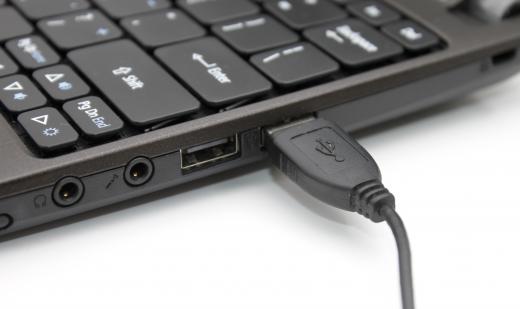
Data on an internal hard drive can be password protected, but this often involves more effort than simply unplugging a device. These passwords may also be vulnerable to attacks and leave your information exposed for someone else. If you want either an internal or external hard drive for sensitive data, an external device is usually easier to protect.
Using One Device for the Other
One thing to consider, however, is that both devices are often interchangeable. An internal hard drive can be placed inside an "enclosure" that allows it to be easily plugged into an external port on a computer. Similarly, most external devices can be opened up, though this usually voids its warranty, and the hard drive within can often be installed directly inside of a computer. This means that a single device can function interchangeably as either an internal or external hard drive with just a little modification.
AS FEATURED ON:
AS FEATURED ON:









-
![An external hard drive.]()
An external hard drive. -
![An internal hard drive.]()
An internal hard drive. -
![An internal hard drive with case removed.]()
An internal hard drive with case removed. -
![An SSD internal hard drive.]() By: teptongAn SSD internal hard drive.
By: teptongAn SSD internal hard drive. -
![An external hard drive may be moved easily between multiple computers.]() By: strannik9211An external hard drive may be moved easily between multiple computers.
By: strannik9211An external hard drive may be moved easily between multiple computers. -
![External harddrives can be connected to computers with USB cables.]() By: macbrianmunExternal harddrives can be connected to computers with USB cables.
By: macbrianmunExternal harddrives can be connected to computers with USB cables.


Discussion Comments
I'd buy an external hard drive. they are cheaper and if you want you can use them as an internal hard drive too. if you don't care about the warranty, just open the case up. there's a regular internal hard drive in the case.
Well my opinion is you should get an external hard drive. they are much more useful.
osakachan: your bios is set to boot to your external hard drive first. you have to edit the boot menu in your bios to boot to your windows drive first.
We recently bought an external hard drive. 1tb, its awesome. problem is we have to unplug it from the computer before we turn it on or our computer boots up into the external rather than the internal. Is there anyway to correct it? Can we just link the two of them?
To install your old hard drive in a new pc is as easy as 1 2 3.
If your new pc has no hard drive, just put it in the hard drive bay and connect the corresponding PSU (Power supply unit) cable and the IDE channel cable (The other ones- mine are grey), then boot the PC. The bios menu might open but only to confirm the hard drive's presence. This hard drive will act as the C: drive, assuming the hard drive has an OS ( operating system) installed.
If you already have a hard drive installed in your new pc and you want to add the old hard drive as an extra hard drive it'll be slightly trickier but not bad.
Both the new and old hard drives will probably need to be jumpered so take the new hard drive out. Basically- in between the hole where the IDE cable goes in and the power cable goes in there are extra IDE pins and one or two plastic sleeves called jumpers. They way they are arranged tells the pc what the hard drive is acting as. When two hard drives are installed at once, one will have to act as the master drive and the other, the slave. The way the jumpers should be arranged are called the jumper settings. The jumper settings are different for each hard drive, but on Maxtor hard drives the settings are printed on the top of the drive. other hard drives have the settings printed in the user manual. Assuming you have done your Homework and know which hard drive you have and you know where to put your jumpers on each drive, its as easy as putting them where they should go. (On a maxtor 9 pin drive the slave drive needs no jumpers at all to act as a slave and the master needs one connected to pins 5 & 6.) Then the hard part is done. With both hard drives configured, slide the hard drives into separate hard drive bays and connect one PSU cable into each one, then connect one part of the IDE channel cable into one hard drive and the other part of the same IDE channel cable into the other. (the one cable should be connected to both hard drives) With the storm overcome, you are free to admire your work. Make sure all cables are properly fastened and switch the power on. The bios menu will open to confirm the new hard drives existence and then will run windows with both the old and new hard drives installed.
Brought to you by D311L1nt0n. Soon to be member wisegeek. I am only 16 so refrain from asking too technical questions.
If you want to use your internal hard drive as an external hard drive, buy an external hard drive enclosure from your local computer store (about $30) it will have everything you need in the kit. You may be required to format the drive in order for it to be compatible.
To salvage an internal hard drive and use it as an internal hard drive in a newer computer, simply plug it in, in the new computer, and hook it up to one of the unused cords from your new computers power supply.
Is there a way to download programs to an external hard drive and transfer them to another computer?
I have an internal hard drive outside of a computer that the motherboard does not work. I have a new computer and would like to recover the data from my internak hard drive. What do I need and how can I connect my internal hard drive to my new computer?
My computer crashed and my internal hard drives are OK. What do I need and where can I get the stuff to connect my internal hard drive to a new computer I got and transfer all my information to my new computer?
Post your comments