
How can I Make Digg Faster?
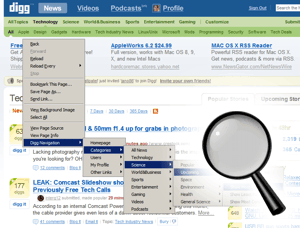 It's common among for Diggaholics to complain about the speed of the digg.com. Even though it's just a well-organized collection of links and text, Digg can be a painfully slow site, especially at peak times. With so many users and so many database queries, it's not surprising that you often have to wait several seconds just to view a page.
While we cannot speed up Digg's cluster, we have made an extension that can reduce the number of pageloads required to get to your desired destination.
Digg Navigation Firefox Extension
Works With: FireFox 1.5 - 2.0

This extension gives you direct access to a wide variety of Digg pages with just one click. The fly-out menus are organized exactly like Digg's site, so it's easy to jump directly to a category or sub-category of posts, choosing the time period they were submitted and the sort order. Normally, it would take four clicks to see the most-dugg Offbeat News of the past 24 hours. That would mean waiting for four different pages to load before finally getting to where you want to go; this extension cuts your navigation time to a fraction of what it was by getting you there in one pageload!
Features
Right mouse click on any page on the internet and you will see "Digg Navigation" in the context menu. This will allow you to access most Digg pages.If you perform the right-click on the link of a username, you will get some extra options associated with that user. These extra options will also appear when you right-click on any user's profile page.
If you perform the right-click on the yellow box that displays the number of Diggs, your context-sensitive menu will include some options related with that particular story.
Options
You can access the options menu for this extension by selecting: Tools > Extensions > highlight the Digg Navigation Extension and click "Options"- You can enter your own username so that you can gain quick access to all of your own pages
- You can also enter the usernames of up to 10 other Diggers so that you can have quick access to their pages. These users do not need to be your friends or your fans; adding their names will just give you access to all of their profile pages.
- You can select how links will be opened--in the same tab, or in new tabs.
And here's the best part: The more people that use this nifty little tool, the faster Digg will be for everyone. Going straight to your desired Digg destination means you don't have to wait for all the pages on your way there, but it also means that individuals who are not using this tool will have less competition for resources, and their pages will load faster, too.
We also hope that the extension will draw more users into less-visited sections of Digg.
Feedback
If you have any suggestions or notice any problems, please let us know!Version History
- Version 1.0: Original released version
- Version 1.1: Fixed links for "general sciences" category. Added support for right-clicks on individual stories.